Track maintenance requests, customer complaints, and site issues. Open ticket, send follow-up 🗓️ tasks and emails. Close when done, it's that simple.
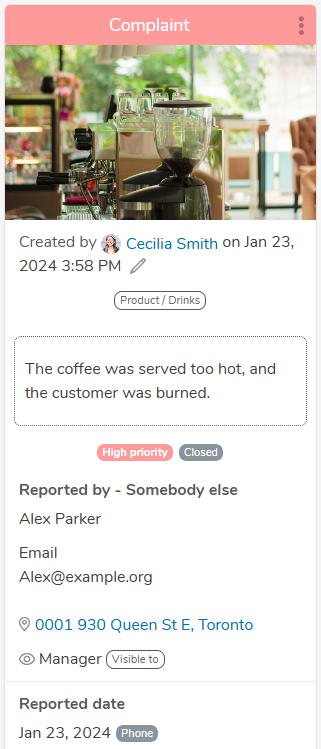
Handling a customer complaint A customer contacts Head Office to report that their coffee was served too hot, they got burned. The complaint needs to be logged, assigned to the right person, and tracked through to resolution, with the right stakeholders kept informed. A Ticket Administrator at Head Office opens a ticket to record the issue. From within the ticket, they: 1) Assign a task to the District Manager responsible for the store. The cause could be a machine that needs tuning or a team that needs retraining on calibration. The District Manager is notified by email and app notification and owns the task through to completion. 2) Email the Area Director to flag that an issue occurred at that store, keeping senior leadership informed without leaving the ticket. Once all actions are completed, the ticket is closed. The complaint is resolved, accountability is clear, and the full history of the issue (who was told, what was done, and when) is held in one place.
Equipment failure and maintenance requests A store’s receiving door breaks. The General Manager needs to report the failure to Head Office quickly, get it repaired, and keep the store operating with minimal disruption. The General Manager opens a ticket describing the fault, attaching a photo and the equipment details. From within the ticket: 1) A Ticket Administrator at Head Office reviews the request and sends a task to the Facilities Manager to arrange a repair, with a due date based on urgency. 2) The Facilities Manager is notified by email and app notification, books a technician, and updates the ticket with the visit date and progress. 3) The District Manager is emailed from within the ticket so they know the store is operating with reduced capacity and can support the General Manager if needed. 4) The General Manager sees every update in the ticket, so there is no need to chase by phone or email. Once the repair is confirmed, the ticket is closed. The store is back up and running, and Head Office has a complete record of the failure, the response time, and the cost.
Create tickets for maintenance, customer complaints, or any site-specific issue.
Set priority and visibility. Assign to a team member.
Close when done.
Create follow-up tasks for all or some team members.
Put all the information your operations leaders and field managers need in one place to execute faster: directives, photos, and supporting documents.
View and complete tasks on any device, anytime.
“We have been able to improve field execution and accountability to our brand standards through use of the Bindy platform to document field visits.”
- Business Policy and Operations Standards Manager
“The tool has become an integral part of store visitations with our franchised network of stores.”
- Director of Operations
“Bindy has helped us achieve greater consistency, efficiency and a stronger in-store experience.”
- Director of Business Development and Strategies
92% of Bindy customers report improved execution of merchandising programs.
88% of Bindy customers report improved task completion and store activities.
89% of Bindy customers report improved customer experience.
91% of Bindy customers report a reduction in business risks.
92% of Bindy customers report saving time on site visits.
95% of Bindy customers report improved health and safety.